- Reviewed
- September 16, 2026
- Environment
- Controlled H.264/AAC test videos and FFmpeg stream-copy exports
- SHA-256 checksum for release 3.69.0
- Stream-copy timing, file size and keyframe behavior
- H.264/AAC export stream properties
- Electron desktop interface in this environment
- Every codec, camera format or playback device
LosslessCut is a desktop tool for the editing jobs that feel too small for a full video editor: remove the start and end of a recording, keep several useful sections, split a large file or join compatible clips. Its main trick is copying the original video and audio streams instead of compressing every frame again.
A simple test exposes both the advantage and the compromise
We created two 30-second, 1280×720 test videos with the same moving picture, visible timestamp and AAC audio. One placed a video keyframe every two seconds; the other placed one every ten seconds. We requested the same section from both files: 5.2 seconds through 22.7 seconds, for a target length of exactly 17.5 seconds.
We then ran a stream-copy export—the operation LosslessCut uses for its ordinary lossless cuts—and compared it with a conventional H.264/AAC re-encode. This is deliberately a small synthetic benchmark, not a promise about every camera, codec or computer.
- Software cost
- Free manual download
- Server or account
- Not required
- Checked release
- 3.69.0
LosslessCut moves compressed data instead of rebuilding it
A normal editor decodes the source, applies edits and compresses the result again. That is necessary for colour correction, titles, transitions, resizing and many other creative changes. It also consumes time and introduces another generation of compression.
LosslessCut asks FFmpeg to copy the existing video and audio streams into a new file around the selected sections. When that works, the kept frames are not re-encoded. Export can therefore be dramatically faster, and there is no new compression loss in those copied streams.
“Lossless” does not mean the exported file becomes smaller than every re-encoded alternative. It means LosslessCut avoids recompressing the content it keeps. File size still depends on the source bitrate, selected duration, tracks and container.
Stream copying took a fraction of a second in our test
On this short file, copying was about 41 times faster than the re-encode. The video remained H.264 at 1280×720, and the copied audio/video stream start difference stayed below 75 milliseconds. We measured the streams rather than listening to the result, so this is not a claim that every unusual source file will remain perfectly synchronized.
The re-encoded file was slightly smaller, but that is not a free victory: it was compressed again. The copied exports preserved the existing compressed packets and, because of keyframe alignment, also contained extra footage before the requested start.
The beginning of a lossless cut may land before the frame you selected
Most compressed video does not store every frame as a complete picture. A keyframe is a full reference image; the frames after it often store only changes. Starting a copied video between keyframes may leave the player without the information needed to reconstruct those first frames.
LosslessCut therefore recommends keyframe cut mode for common files. Its documentation warns that the segment start is normally rounded to the nearest previous keyframe. Our 5.2-second start became 4.0 seconds in the file with two-second keyframes and 0.0 seconds in the file with ten-second keyframes. Both end results were longer than requested.
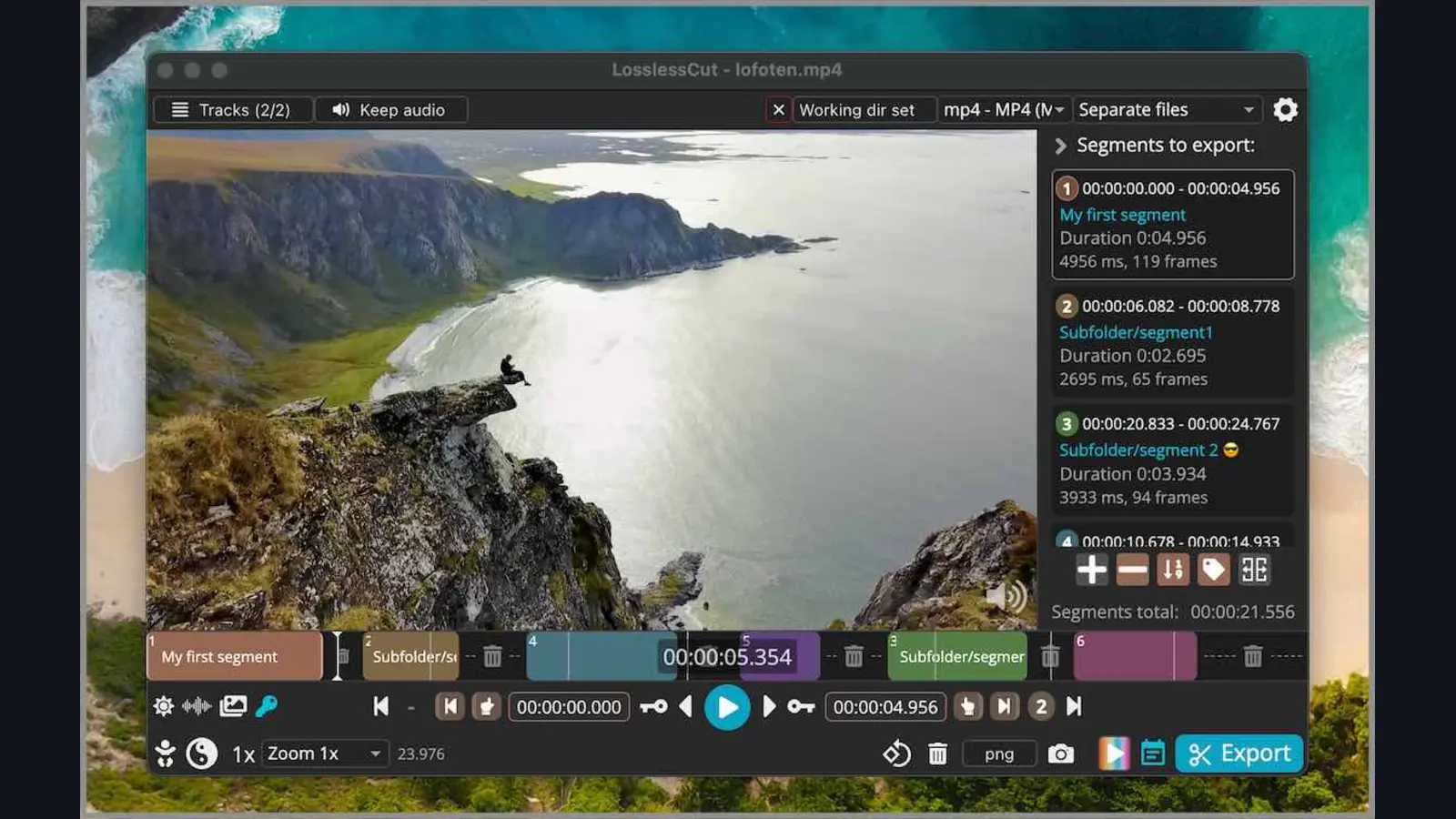
The application shows keyframes on its timeline and lets the user jump between them. Experimental Smart Cut tries to re-encode only the part from the chosen cut point to the next keyframe, but the project explicitly says it does not work with every file. Test an exported clip before deleting the original.
The practical workflow stays refreshingly small
Open a video, move the playhead to the beginning of the useful section, set the start point, move to the end and set the end point. Additional segments can preserve several good moments from one long recording. The export panel controls whether segments become separate files or one combined result.
That makes LosslessCut especially useful for phone recordings, screen captures, security-camera clips, GoPro files and long event videos where the goal is simply to remove dead time. It can also rearrange segments, extract audio or subtitle tracks, change containers and join files that share compatible codec parameters.
Joining is not magic. Two clips may both end in .mp4 while using different resolutions, frame rates, codecs or internal timing. The official troubleshooting guide recommends matching codec parameters and sometimes remuxing troublesome files before concatenation.
It is not a smaller version of Premiere or DaVinci Resolve
LosslessCut deliberately avoids jobs that require rebuilding the picture. The official FAQ says it does not handle colour grading, overlays, watermarks, blur, transitions, resizing, reversing, GIF creation, burned-in subtitles or audio mixing. Use a full editor when the content itself needs to change.
Preview support and export support are also different. LosslessCut uses Chromium for playback, so some formats can be cut by FFmpeg even when the built-in preview cannot display them directly. FFmpeg-assisted playback can create a temporary low-quality preview while still exporting from the original source.
Metadata is another reason to keep originals. The project notes that FFmpeg does not always preserve camera and EXIF metadata correctly. Confirm creation dates, rotation, GPS information and proprietary GoPro data tracks before treating an export as an archival replacement.
The GitHub downloads are free; store versions support the developer
Official manual downloads are available for Windows, macOS and Linux without an account or subscription. The Microsoft and Apple store versions are paid options that provide simpler installation and automatic stable updates while supporting the project. Linux also has an official Snap package.
Use the project's repository or website rather than a random download portal. The current instructions specifically use a .7z archive on Windows and a .dmg on macOS; the unsigned APPX and macOS PKG files are marked as non-working. The application processes local files and does not require a server.
- You mostly remove unwanted beginnings and endings
- Large recordings make normal exports painfully slow
- You want to preserve the source stream quality
- You need quick splits, track extraction or remuxing
- The first frame must be exact
- You need titles, transitions or colour correction
- Clips use incompatible formats or resolutions
- You want a smaller file through deliberate compression
Sources checked September 16, 2026: official repository and download instructions, official usage guide and FAQ, keyframe and export limitations, release 3.69.0 and GPL-2.0 license.
The NoSub verdict
LosslessCut solves one common problem better than a heavyweight editor: keeping useful sections of a large recording quickly and without recompressing them. The speed difference in our controlled export was enormous, and the official interface keeps segment selection close to the timeline.
The name needs one qualification. The kept streams can remain lossless while the chosen start still moves backward to a keyframe. Use it for fast practical trimming, inspect the exported beginning and keep the original until picture, audio and metadata have all been checked.