LubeLogger is a private digital service book for cars, motorcycles and other vehicles. It tracks maintenance, repairs, fuel, expenses, documents and reminders without placing the useful history behind a monthly plan.
The useful part appears before the complicated part
LubeLogger 1.7.2 started as a small local website on our test computer. We added a 2021 Toyota Corolla, recorded an oil-and-filter change at 45,200 kilometres, logged a fuel stop at 45,240 and created an oil reminder for 50,000 kilometres and December 8.
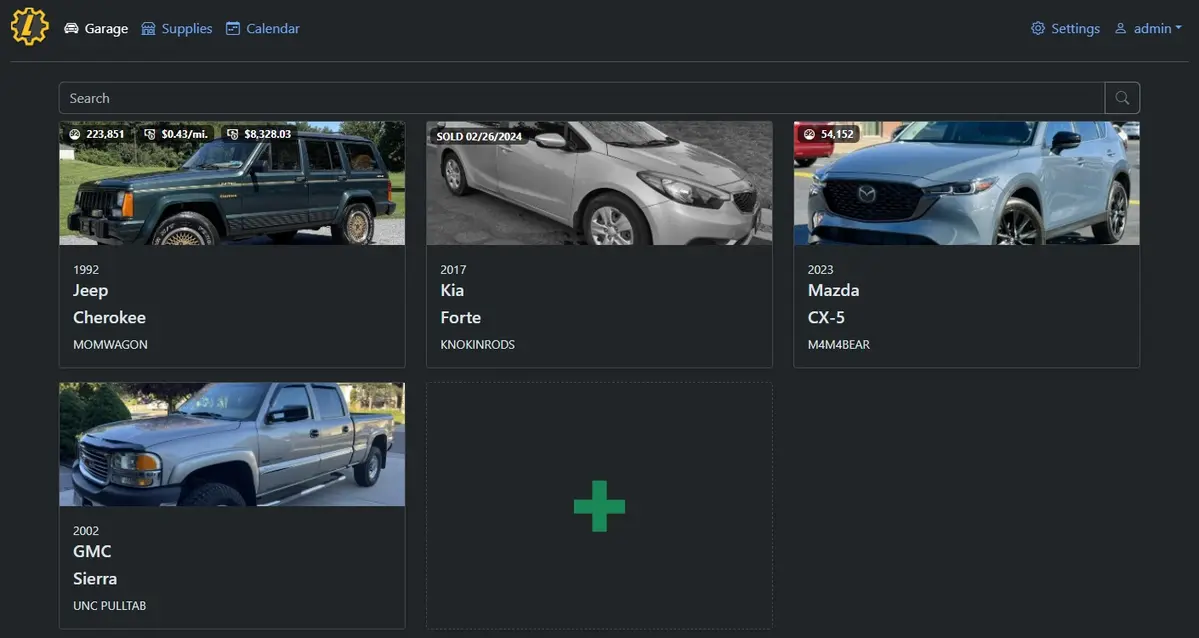
The garage view made the vehicle easy to find, while each record type had its own tab. The interface is closer to a detailed household spreadsheet than a glossy phone app, but it removes the spreadsheet work: totals, mileage history and due reminders are calculated from the entries.
Our clean install displayed a generic currency symbol until a locale was configured. That is harmless but confusing, and it shows why the first setup session should include region, currency, date format and distance units—not just adding a car.
- Software cost
- Free
- Account required
- No, on a private local install
- Tested release
- 1.7.2
It replaces several messy places, not the mechanic
A typical household has service invoices in the glovebox, fuel spending in bank statements, tyre dates in someone's memory and the next oil change on a sticker. LubeLogger puts those records beside the vehicle and can keep receipts or notes with the relevant entry.
It does not contact your manufacturer, discover safety recalls or prove work was performed. Keep original invoices when warranty, resale or legal evidence matters. LubeLogger is your organised copy of the history, not an official replacement for the garage or manufacturer record.
Windows is the easiest trial; Docker is the better long-term route
The official Windows release is self-contained: extract the archive, run the application and open the local address in a browser. That is the best way to decide whether the family will actually keep records before buying hosting or learning Docker.
The project describes its Docker image as the most reliable and up-to-date distribution channel. Docker makes updates and persistent storage easier to manage on a home server, NAS or VPS, but the reader must understand volumes, backups and network access first.
- Existing Windows or Linux computerFree; available only while it is running
- Existing home server or NASNearly free beyond electricity
- Small VPSAbout $4–6 per month plus backups
- MaintenanceUpdates, backup checks and occasional restore tests
Authentication is off by default
That default makes a local first run pleasantly quick, but it becomes unsafe the moment the service is reachable by people you do not trust. The official documentation strongly recommends enabling authentication for an internet-accessible instance. Remote access also needs HTTPS, updates and a properly configured reverse proxy or private network.
Vehicle photos, registration details, licence plates, mileage and repair receipts can reveal more than expected. Do not put LubeLogger directly on the public internet just to reach it from a phone. A household-only installation on the local network is simpler; secure remote access is an intermediate project.
Basic reminders appear inside the app. Email notifications require SMTP configuration, and scheduled events use the server's local time. Test the date format, timezone and notification path before relying on it for a registration or inspection deadline.
The built-in backup is useful—and restoration actually worked
We created a backup from the populated test instance, replaced its data with a fresh empty database and restored the downloaded archive. The test Corolla returned with its service, fuel and reminder entries intact.
That successful restore is encouraging, but it does not make one copy enough. Download backups away from the computer hosting LubeLogger. If receipts and vehicle photos matter, verify that those folders are protected too. The project explicitly recommends making a backup before every update, whether using Docker or the standalone builds.
- Several household vehicles need one history
- You want reminders without a paid app
- Fuel and repair costs are worth tracking
- You value an exportable, self-controlled database
- Nobody will enter mileage or receipts
- You need automatic manufacturer service records
- You cannot maintain or back up a small server
- A notes app already covers one lightly used vehicle
Sources checked September 8, 2026: official installation guide, authentication documentation, backup and upgrade guide, fuel-record documentation, release 1.7.2 and MIT license.
The NoSub verdict
LubeLogger solves a real household problem better than another generic spreadsheet. The app makes service history, fuel spending and reminders useful together, and its built-in backup passed our clean restoration test.
The recommendation depends on habit. A private database nobody updates is less useful than a paper folder someone actually keeps. Trial it locally, configure the correct units and decide who records each receipt before making it an always-on household service.