- Reviewed
- September 12, 2026
- Environment
- Wallos 5.7.1 official disposable demo
- Three subscription records in OMR, USD and EUR
- Reminder and cancellation settings
- JSON export after recording a replacement service
- Self-hosted deployment
- Live notification delivery
- Backup restoration
Wallos is a self-hosted dashboard for subscriptions and other recurring payments. It records what renews, when the next charge arrives, what it costs each month or year and when you need to cancel—without giving a budgeting company access to your bank account.
Manual entry is the limitation—and part of the privacy advantage
Wallos does not connect to a bank and automatically discover charges. We entered each service name, price, billing cycle, currency and next payment date ourselves. That makes the first session slower than a bank-connected subscription finder, but it also avoids sharing banking credentials or transaction history with another company.
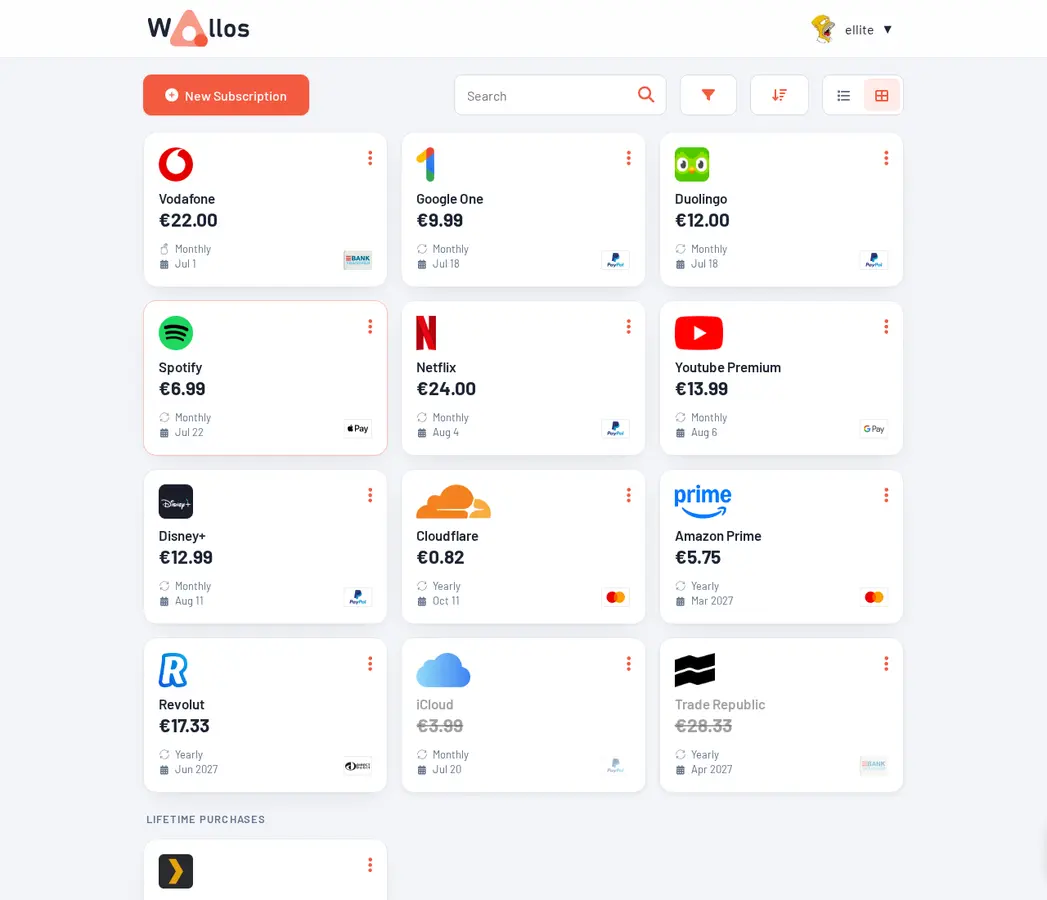
Our three records appeared immediately as cards with their prices and renewal information. The statistics and calendar views then turned those entries into something a spreadsheet usually fails to provide at a glance: what is coming next and how small monthly charges add up over a year.
The test also exposed the central rule of this kind of software. Wallos can only warn about subscriptions that somebody records and keeps current. It will not notice a surprise price increase or a forgotten service on its own.
- Software cost
- Free
- Bank connection
- Not required
- Tested release
- 5.7.1
The dashboard answers the questions that cause expensive surprises
A useful subscription list needs more than logos. Wallos can organise services by category, billing cycle, payment method and renewal date. It can also show monthly and yearly totals, upcoming payments and spending statistics. Those views make annual renewals visible beside familiar monthly bills.
Wallos is a planning record, not a payment system. Marking an entry inactive does not cancel the real service, and editing a renewal date does not change the provider's contract. Cancellation must still happen with the company that charges you.
Multiple currencies work, but conversion needs a decision
We added subscriptions in OMR, USD and EUR and confirmed that all three currencies remained attached to the right records and appeared in the export. Wallos includes a currency list and lets an administrator add a custom currency, which is useful for households whose local currency is missing or formatted differently.
Combining those prices into one meaningful total is a separate problem. Automatic exchange-rate updates can use the optional Fixer service and its API key. Without it, the safest approach is to treat foreign-currency totals as estimates or maintain the conversion rates manually. The card's charge—not yesterday's dashboard estimate—remains the source of truth.
A reminder only works after the scheduled job and delivery route work
Each subscription can carry a renewal notification. Wallos supports several delivery routes, including email, Discord, Telegram, Gotify, Pushover and webhooks. That breadth is useful, but none of those channels is automatic just because a checkbox is enabled.
Docker handles the application as one long-running service. A manual PHP installation also needs the project's scheduled commands—cron jobs—to advance payment dates, refresh exchange rates and send notifications. Forgetting those jobs can leave a dashboard that looks normal while reminders silently fail.
In our demo test, the reminder setting was stored correctly and a cancellation date was recorded. We did not configure SMTP or another notification provider, so notification delivery remains unverified. Before relying on Wallos for a non-refundable annual renewal, create a near-term test subscription and wait for a real alert on the device you actually use.
Docker is the most approachable long-term setup
The official Docker instructions expose Wallos on port 8282 and keep its database and logos in persistent folders. On an existing home server or NAS, that is the clearest route because the application and its required PHP components arrive together.
The bare-metal installation is possible, but it asks for a web server, PHP 8.3 and several PHP extensions before the scheduled commands are configured. That route suits an administrator who already maintains a PHP server, not a beginner trying self-hosting for the first time.
- Existing home server or NASFree beyond electricity and storage
- Small VPSAbout $4–6 per month plus backups
- Optional exchange ratesA Fixer account and API key
- Ongoing workUpdates, entries, notification tests and backups
A private subscription list is still sensitive financial data
The database can reveal which services a household uses, how much it spends and which payment methods are involved. Keep Wallos on a trusted network when possible. Internet access should use HTTPS, strong authentication, current software and a reverse proxy or private network configured by someone who understands the exposure.
Wallos includes an administrator backup route that packages its SQLite database and uploaded logos. We inspected that implementation, but we did not run the restore ourselves, so it should not be treated as proven until the household completes its own clean restore test. Copy backups away from the server and make a fresh one before every update.
- Annual renewals keep being forgotten
- The household pays in several currencies
- You want totals without linking a bank account
- An existing server already runs Docker
- You need automatic transaction discovery
- Nobody will maintain the entries
- A short spreadsheet already works reliably
- You cannot secure and back up a small server
Sources checked September 12, 2026: official repository and installation guide, release 5.7.1 and GPL-3.0 license.
The NoSub verdict
Wallos is most convincing as a calm, private renewal calendar. It gathers costs that are otherwise scattered across inboxes and app stores, works with multiple currencies and makes yearly spending much harder to ignore.
It does not remove the work—it changes who does it. Choose Wallos when keeping financial data private and avoiding another subscription matters more than automatic bank scanning. Start with the five most expensive renewals, test one real notification and prove a backup can be restored before entering everything else.